
Let us study the closures in JavaScript in some detail and solve some problems which will hopefully clear your understanding of closures and their usage.
What is closure?
In JavaScript, a closure is a function that has access to the variables in its outer scope, even after the outer function has returned. A closure is created when an inner function is returned from an outer function, and the inner function has access to the variables in the outer function's scope chain. The closure has access to variables in three scopes: its own scope (variables defined between its curly brackets), the outer function's scope, and global variables.
Here's an example of a closure in JavaScript:
function outerFunction() {
  const outerVariable = "I am outside!";
  function innerFunction() {
    console.log(outerVariable);
  }
  return innerFunction;
}

const innerFunc = outerFunction();
innerFunc(); // Output: I am outside!
In this example, innerFunction() is a closure because it has access to outerVariable, which is defined in the outer function outerFunction().
Image Explaination
Let us understand the same concept with an image, as shown below:
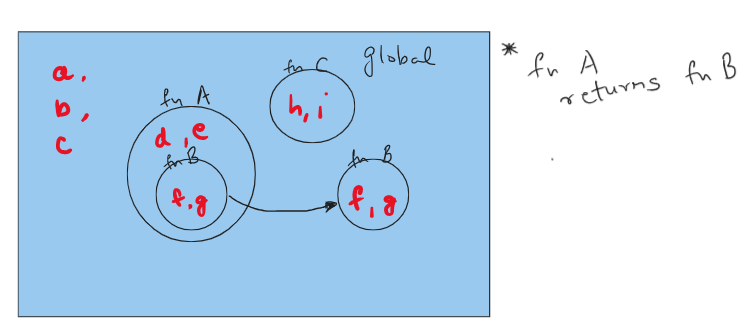
As seen in the above image, we have created function A and function C in the global scope, whereas function B is created inside function A and is exported to the global scope by returning it. Furthermore, we have created the variables a, b, and c in the global space, variables d and e inside function A, variables f and g inside function B and variables h and i inside function C.
The below list shows us the functions and variables that can be accessed from within these functions:
function A -> a, b, c, d, e
function B -> a, b, c, d, e, f, g
function C -> a, b, c, h, i
Note, function B was returned by function A and is now available in the global scope just like function C however, it can access the variables d and e declared inside function A which are not available in the global scope as we can see through function C. This is what is meant by the closure of the function B, i.e., it has access to the variables declared in the outer function scope.
Examples
Now let us see some examples which use closures. Hopefully, this will help you to understand the topic in more detail and provide some clarity.
Example 1
function f () {
    var total = 0;
    return function f2(b) {
        if (b) {
            total += b;
            return f2;
        }
        else {
            return total;
        }
    }
}

var sum = f();
sum(1)(2)(3)(4)(5)();
// 15
sum(6)();
// 21
In the above code, closures are used to create a function that can be called multiple times with different arguments and keep track of the total sum of all the arguments passed to it.
The variable sum is assigned the value of calling f(). This creates a closure that includes the variable total, which is initialized to 0. Each time sum() is called with an argument, it adds that argument to the value of total. When sum() is called with no arguments, it returns the value of total. The first call to sum(1) adds 1 to the value of total, which is now 1. The second call to sum(2) adds 2 to the value of total, which is now 3. The third call to sum(3) adds 3 to the value of total, which is now 6. The fourth call to sum(4) adds 4 to the value of total, which is now 10. The fifth call to sum(5) adds 5 to the value of total, which is now 15. Finally, a call to sum() with no arguments returns the value of total, which is 15.
The next call to sum(6) used the closure variable total, which was previously 15 and adds 6 to this value to get the new value of 21. To create a new closure we would need to call the function f() again.
Example 2
function createArray() {
  var arr = [];
  for (var i = 0; i < 5; i++) {
    arr[i] = function() {
      return i;
    };
  }
  return arr;
}

var myArray = createArray();
console.log(myArray[0]()); // Output: 5
In this code, the function createArray() creates an array of functions that return the value of i. The variable i is defined in the outer function and is accessible to the inner functions because of the closure.
When the array is created, each function is assigned to an element of the array. However, because of the way closures work in JavaScript, each function has access to the latest value of i, which is 5. This means that when any of the functions are called, they all return 5.
But shouldn't myArray[0]() return 0 ? Let us modify the code and see how we can achieve this.
function createArray() {
  var arr = [];
  for (var i = 0; i < 5; i++) {
    arr[i] = (function(x) {
      return function() {
        return x;
      };
    })(i);
  }
  return arr;
}

var myArray = createArray();
console.log(myArray[0]()); // Output: 0
In this modified code, we use an immediately invoked function expression (IIFE) to create a new scope for each iteration of the loop. The variable x is passed as an argument to the IIFE and is used as a local variable in the inner function. This ensures that each function has access to its own copy of x, which has the correct value.
Conclusion
Closures in JavaScript are powerful mechanisms that allow functions to maintain access to variables from their outer scopes, even after those scopes have finished executing. This enables flexible and efficient coding patterns, enhancing the functionality and versatility of JavaScript code. Through clear explanations, practical examples, and illustrative visuals, we've explored how closures work, their significance, and potential pitfalls. Armed with this understanding, developers can harness the potential of closures to write more robust and efficient code in their JavaScript projects.
I hope you enjoyed reading this post. Consider hitting the like button and feel free to add any comments.
Thank you and happy coding!


